Updated Vishwas Sharma Guides 16 min read
Best Aspect Ratio for YouTube Shorts, TikTok, and Instagram Reels (Tested & Explained)
A practical guide to choosing the best aspect ratio for YouTube Shorts, TikTok, and Instagram Reels, with tested recommendations for vertical video, feed crops, and repurposed horizontal clips.
Introduction
One of the first things new content creators run into is a confusing question: which aspect ratio should I use? You shot a great clip, you want to post it on YouTube Shorts, TikTok, and Instagram Reels all at once — but the same file looks cropped on one platform, tiny on another, and weirdly letterboxed on a third.
The good news is that the answer is simpler than it seems. Most of the time, one format handles the majority of platforms perfectly. The trickier part comes when your original footage is horizontal — shot on a regular camera or screen recording — and you need to convert it to vertical. That is where aspect ratio choices, background fill effects, and safe zones start to matter a lot more.
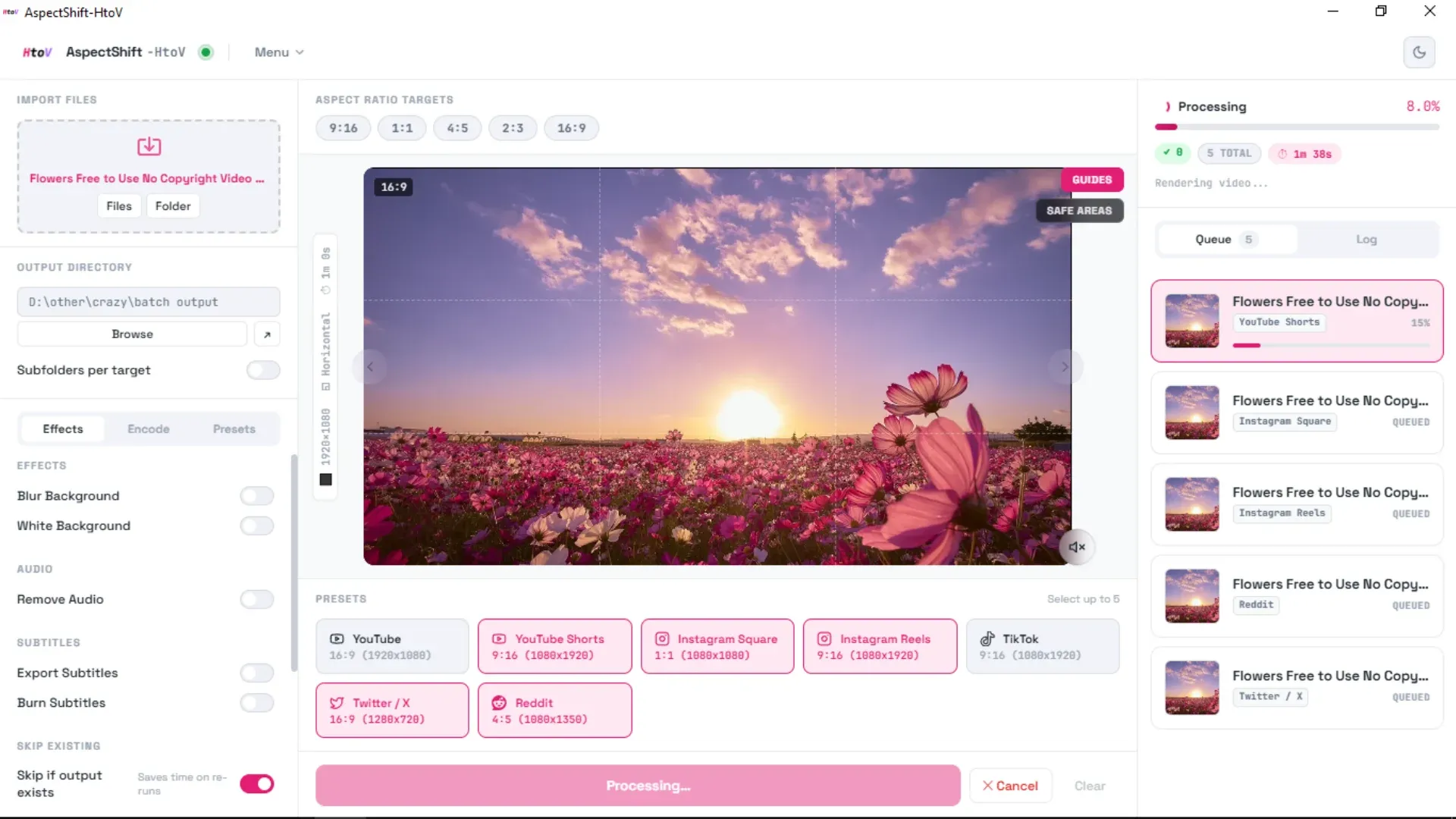
This guide covers the recommended aspect ratios for YouTube Shorts, TikTok, Instagram Reels, Instagram Feed, Reddit, and X (formerly Twitter). It also explains why each platform prefers certain formats, and what actually happens when you choose the wrong one. I have included observations from my own real-world testing while developing AspectShift-HtoV, a batch video conversion tool I built specifically for repurposing horizontal clips into vertical formats.
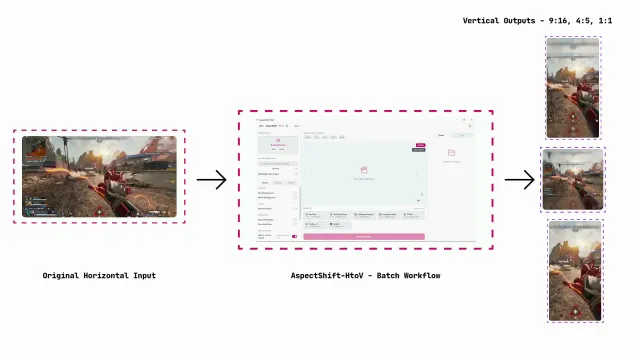
Multiple social media output formats created from one video
Quick Answer
If you only read one section of this guide, read this one.
The single best aspect ratio for YouTube Shorts, TikTok, and Instagram Reels is 9:16, exported at 1080×1920 pixels. Every one of those platforms is built around this format. It fills the entire phone screen, requires no letterboxing, and matches the native experience viewers expect when swiping through a vertical feed.
Here is the complete at-a-glance reference:
| Platform | Best Aspect Ratio | Resolution | Notes |
|---|---|---|---|
| YouTube Shorts | 9:16 | 1080×1920 | Official recommended format; fills the Shorts feed on any phone |
| TikTok | 9:16 | 1080×1920 | Native format for the For You Page; other ratios are letterboxed |
| Instagram Reels | 9:16 | 1080×1920 | Full-screen in the Reels tab; feed preview crops to 4:5 |
| Instagram Feed | 4:5 | 1080×1350 | Maximizes vertical feed space; best for profile grid posts |
| Square posts | 1:1 | 1080×1080 | Works for memes and reposts; loses screen real estate in the feed |
| 4:5 | 1080×1350 | Performs well on both mobile and desktop; 16:9 is catching up | |
| X (Twitter) | 16:9 or 4:5 | Varies | 16:9 for desktop/horizontal viewing; 4:5 for mobile-first posts |
Everything else in this post explains the reasoning behind these choices, what to do with horizontal source footage, and when the secondary formats (4:5 and 1:1) are actually worth using.
What Is an Aspect Ratio? (For Absolute Beginners)
Before getting into the platform specifics, a quick explanation for anyone new to this concept.
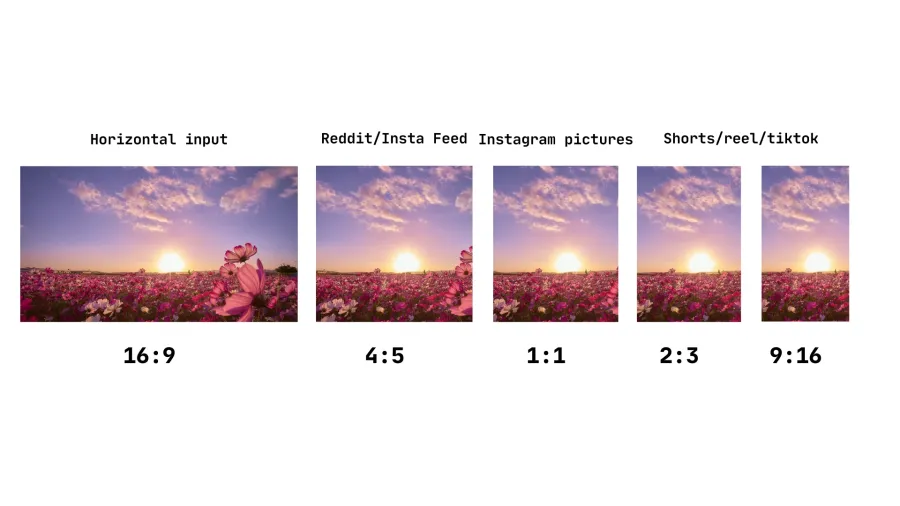
An aspect ratio describes the relationship between the width and height of a video or image. It is written as two numbers separated by a colon, like 16:9 or 9:16. The first number is the width; the second is the height.
- 16:9 is wide and short — this is the standard “widescreen” format you see on YouTube, television, and most computer monitors.
- 9:16 is tall and narrow — this is the vertical format used for phone-first video on Shorts, TikTok, and Reels. It is literally 16:9 rotated 90 degrees.
- 4:5 is a medium portrait shape — slightly less tall than 9:16, used for Instagram feed posts and as an alternative to full vertical.
- 1:1 is a perfect square, the classic Instagram format.
When a video’s aspect ratio does not match the space the platform is trying to display it in, one of two things happens: the platform either adds black bars to fill the empty space (called letterboxing), or it crops the video to fit — potentially cutting off important parts of the frame.
How I Tested This
During the development of AspectShift-HtoV, I was converting the same horizontal clips into multiple vertical formats and uploading them to each platform repeatedly to check how they looked in practice. This was originally just a quality-assurance process, not a structured study — but the pattern that emerged across platforms was consistent enough to be worth sharing.
For each platform I paid attention to how the video filled the screen, how readable any on-screen text was, whether the subject was properly visible after the crop, and how the video felt while scrolling past it in the feed.
The takeaway that surprised me most: videos with a background fill effect — where the horizontal clip is placed in the center of a vertical canvas and the empty space above and below is filled with a blurred or colored background — consistently looked better than either a hard center crop or plain letterboxing. The blurred background version in particular felt intentional and professional rather than like an afterthought. I will return to this throughout the platform-specific sections below.
Platform-by-Platform Breakdown
YouTube Shorts
YouTube officially classifies any vertical or square video under three minutes as a Short. The platform recommends 9:16 at 1080×1920 pixels as the standard format, and for good reason — it fills the entire phone screen edge to edge without any black bars, which is exactly the experience Shorts was designed around.
If you upload a horizontal (16:9) video to Shorts, YouTube will display it with black bars above and below. This makes the actual video much smaller on screen and significantly reduces the visual impact. Viewers are much more likely to scroll past a video that does not fill their screen.
What I noticed during testing: when uploading repurposed horizontal clips, the versions that performed best were not necessarily the ones with the most aggressive crop. Videos that used a blurred background fill — where the horizontal clip runs in the center at roughly a 4:5 size inside the 9:16 frame, with the blurred version of the same video stretched behind it — looked clean and professional. The algorithm treated them the same as native 9:16 content, but they preserved more of the original frame than a tight center crop would have.
A few things to keep in mind for YouTube Shorts specifically:
- Keep important text, faces, and UI elements away from the very top and bottom of the frame. YouTube’s playback interface overlays buttons and captions in those areas.
- Since October 2024, Shorts can be up to three minutes long, but shorter videos (under 60 seconds) still tend to perform better for new creators.
- If your content has text overlays from the original horizontal version — like a gaming HUD, subtitle track, or progress bar — a center crop will almost certainly cut them off. Use background fill instead.
Bottom line for Shorts: Use 9:16 at 1080×1920. If you are converting horizontal footage, blurred background fill is a much better result than a hard center crop.
TikTok
TikTok is where the vertical video format became the norm, and it is still the platform that handles non-standard formats the least graciously. The recommended format is 9:16 at 1080×1920 pixels, and the platform’s For You Page algorithm consistently favors content that fills the full screen.
TikTok does accept 1:1 (square) and 16:9 (horizontal) videos, but both formats display with black bars. Non-native formats feel out of place in a feed that otherwise shows content edge to edge, and they tend to perform worse as a result.
From my testing:
- 9:16 is the clear winner for TikTok. Content shot or exported in this format sits naturally in the feed and gets the full-screen immersive treatment the platform is designed for.
- 4:5 is a secondary option and is gradually becoming more common, particularly for creators who are cross-posting from Instagram. It will display with a small amount of letterboxing at the top and bottom, but it is less jarring than 16:9.
- 1:1 works for meme-style content and reposts, where the square format is part of the aesthetic. For anything else, it gives up too much screen space.
- 16:9 horizontal is an option for creators who are also posting the same content on their main YouTube channel, but it is not recommended as your TikTok-primary format.
One technical note: TikTok’s interface overlays captions, usernames, and action icons over specific parts of the frame. Keep important text and graphics away from the bottom third (where captions and usernames appear), the right edge (where like, comment, and share buttons sit), and the very top (where navigation elements live).
Bottom line for TikTok: 9:16 at 1080×1920. This has been the standard since the platform launched, and it remains the safest, highest-performing choice.
Instagram Reels
Instagram Reels is probably the most format-flexible of the three platforms, partly because Instagram has been supporting multiple aspect ratios across its different content types for years. But for Reels specifically, the official recommended format is still 9:16 at 1080×1920 pixels.
There is one important thing to understand about how Reels appear in different parts of the app:
- In the Reels tab and on the Explore page, videos play at the full 9:16 ratio — the entire phone screen.
- In the main feed, Instagram crops Reels to a 4:5 window, centered vertically. This means the top and bottom of your 9:16 frame get cut off in the feed preview.
The practical takeaway: design your Reels for 9:16, but make sure your most important content — your face, the key visual, any text you want readable — is centered in the frame so it survives the 4:5 feed crop.
For Instagram feed posts (not Reels, but static image and video posts in your profile grid), 4:5 at 1080×1350 pixels is actually the better choice. It takes up more vertical real estate in the feed than a square 1:1 post, which means more of the screen is dedicated to your content and less to other posts above and below it. This is why most photography pages and professional accounts have shifted away from square posts.
From my own testing on Instagram:
- 9:16 with blurred background and a 4:5-framed center performs well for gaming clips, tutorials, and anything where you want to show more of the original horizontal frame.
- 1:1 still works well for photos and meme-style content in the feed.
- For Reels, 9:16 is the safest default regardless of content type.
Bottom line for Instagram: Use 9:16 for Reels, 4:5 for feed posts, and 1:1 only when the square format is intentional (memes, photography with centered subjects).
Reddit’s video player is relatively recent compared to the other platforms, but it has matured into a consistent experience across mobile and desktop.
From testing, 4:5 at 1080×1350 is the format that looks best across both contexts. It is tall enough to feel intentional on a phone, while not so tall that it becomes awkward on a desktop browser where the viewport is wider. Videos in this format tend to perform well in subreddit feeds on mobile, where most Reddit browsing happens.
16:9 horizontal video is also common on Reddit, particularly in gaming and tech communities where the original content is always shot in landscape mode. It renders fine on desktop but feels small on mobile, and Reddit’s algorithm does not appear to promote it as prominently in mobile feeds.
Bottom line for Reddit: 4:5 is a reliable choice for mixed audiences. 16:9 is fine if your audience is primarily desktop-based.
X (Twitter)
X displays video differently depending on how it appears in the timeline. On desktop, landscape video naturally fills a wider preview card. On mobile, portrait formats take up more of the screen.
4:5 is a good default if you want the video to perform well on mobile without looking awkward on desktop. 16:9 works well if your content is primarily meant for desktop viewers or if it is screen-recorded, gameplay, or anything that was captured in widescreen format.
Bottom line for X: 4:5 for mobile-first content, 16:9 if the content is inherently horizontal.
The Cropping Problem With Horizontal Videos
This is the section that matters most if you are starting with footage shot in 16:9 — a screen recording, a camera clip, a gaming session, a tutorial.
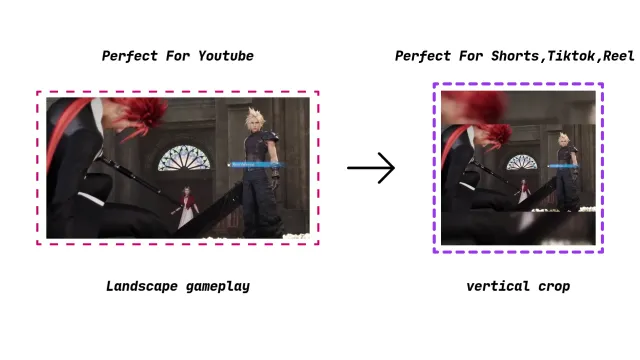
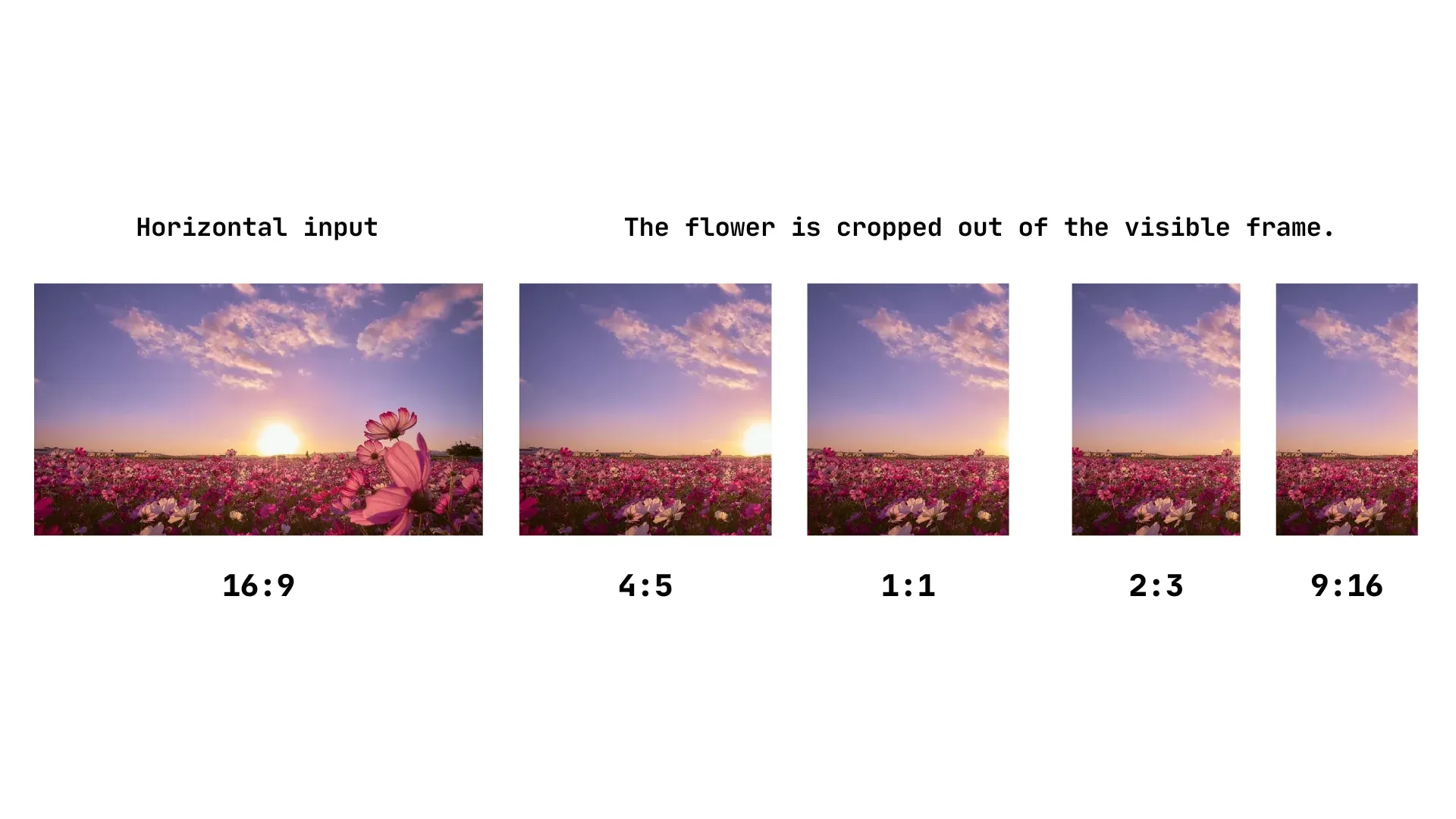
A simple center crop from 16:9 to 9:16 takes a wide frame and keeps only the middle strip. That works fine if your subject is in the center of the frame and nothing important is on the left or right edges. But in many types of content, the interesting parts are not in the center:
- Gaming footage: the HUD elements (health bars, minimap, score) are usually in the corners.
- Tutorials and screen recordings: the content being demonstrated is often off-center.
- Interviews and podcasts: two people are side by side, and a center crop will favor one over the other.
- Text overlays and captions: original subtitles placed at the bottom of a 16:9 frame will be cut off or pushed uncomfortably close to the edge.
- Product demos: the product is often placed deliberately off-center for composition reasons.
Bad crop example showing important content cut off
The alternative to hard cropping is background fill — placing the original horizontal clip in the center of a vertical canvas at a reduced size, and filling the empty space above and below with a background effect. We cover the full workflow for converting horizontal video to vertical without cropping important content in a separate guide, but here are the most common background options:
- Blurred background: A zoomed-in, blurred version of the same video fills the background. This looks intentional and professional, and it is by far the most popular technique among repurposed content creators.
- Black background: Clean and minimal. Best for content where the visual is self-contained and the blank space does not feel empty.
- White background: Works well for meme-style content, text-heavy clips, and social media reposts where the white space feels like a design choice.
The blurred background approach in particular tends to get the best reception on YouTube Shorts and Instagram Reels because it looks like a deliberate aesthetic rather than a workaround.
When 4:5 or 1:1 Makes Sense
Even though 9:16 is the right default for short-form video, there are specific situations where 4:5 or 1:1 is actually the better choice.
Use 4:5 when:
- You are posting to the Instagram feed (not Reels) and want maximum vertical space.
- You are cross-posting to Reddit and want the video to look good on both mobile and desktop.
- Your horizontal source footage has content distributed across the full width, and a 4:5 frame can show more of it than a 9:16 crop would.
- You are producing content for X (Twitter) and mobile performance matters.
Use 1:1 when:
- The subject is already perfectly centered in the original frame and nothing important is at the edges.
- You are creating meme content, short reaction clips, or reposts where the square format is part of the look.
- You are posting photos to the Instagram feed alongside Reels and want a consistent grid aesthetic.
For short-form video as your main format — the kind you want discovered by new audiences on Shorts, TikTok, and Reels — neither 4:5 nor 1:1 replaces 9:16. They are useful secondary formats for specific contexts.
Best Workflow for Repurposing Horizontal Clips
If you have a horizontal clip and want to post it across multiple vertical platforms, here is a straightforward workflow:
- Import the clip into your conversion tool (I built AspectShift-HtoV specifically for this step).
- Choose your target format. For most cases, start with 9:16 at 1080×1920.
- Decide on background fill. If a center crop would cut off important content, use blurred background fill. If the subject is centered and you are comfortable with the crop, a straight center crop is faster.
- Check safe zones. Make sure no important text, faces, or key visuals sit within roughly 10% of the top, bottom, or side edges. Platform UI elements will overlap that area.
- Export and spot-check on a phone before posting. What looks fine on a monitor can look wrong on a phone screen.
Repeating this once for each platform (or batching all outputs in one pass) takes a fraction of the time compared to doing it manually inside a video editor, and it ensures consistency across all your uploads.
AspectShift-HtoV social media output formats
Recommended Settings at a Glance
| Goal | Aspect Ratio | Resolution | Recommended Approach |
|---|---|---|---|
| Shorts, TikTok, and Reels | 9:16 | 1080×1920 | Default for all short-form vertical video |
| Instagram feed posts | 4:5 | 1080×1350 | Maximum vertical space in the profile grid |
| Memes, reposts, centered subjects | 1:1 | 1080×1080 | Square framing only when intentional |
| Horizontal source, no hard crop wanted | 9:16 | 1080×1920 | Use blurred or colored background fill |
| Reddit mixed mobile/desktop audience | 4:5 | 1080×1350 | Good balance for both viewing contexts |
| X (Twitter), mobile-first content | 4:5 | 1080×1350 | More vertical real estate on mobile timelines |
FAQ
What is the best aspect ratio for YouTube Shorts?
The best aspect ratio for YouTube Shorts is 9:16 at 1080×1920 pixels. This is the format YouTube officially recommends, and it fills the entire phone screen without any black bars. If you are converting horizontal footage, use a blurred background fill inside a 9:16 canvas rather than a hard center crop.
What is the best aspect ratio for TikTok?
9:16 at 1080×1920 pixels is the native TikTok format and the one that performs best in the For You feed. TikTok does accept 1:1 and 16:9 videos, but non-vertical formats are letterboxed and generally receive less reach. Stick with 9:16 for any content you want to grow on TikTok.
What is the best aspect ratio for Instagram Reels?
9:16 at 1080×1920 pixels for Reels, and 4:5 at 1080×1350 pixels for feed posts. When your Reel appears in the main feed, Instagram automatically crops it to a 4:5 window centered in the frame — so keep your key visuals in the center third of your 9:16 video.
Should I crop my horizontal video into 9:16?
Only if the subject is centered and nothing important is at the left or right edges. For anything else — gaming footage, tutorials, screen recordings, multi-person interviews — use a background fill effect instead. Blurred background fill looks intentional and professional, and it preserves much more of the original frame.
Is 4:5 better than 9:16 for Instagram?
It depends on what you are posting. For Reels, 9:16 is better because it fills the full screen in the Reels tab. For regular feed posts and profile grid images, 4:5 is better because it takes up more vertical space in the scroll feed, making your content harder to scroll past.
Does YouTube Shorts support videos longer than one minute?
Yes. Since October 2024, YouTube classifies any vertical or square video up to three minutes as a Short. However, shorter videos still tend to perform better for new channels, and anything over one minute with Content ID claims may be blocked from the Shorts feed until those claims are resolved.
Final Thoughts
If you take one rule away from this guide: use 9:16 at 1080×1920 as your default for YouTube Shorts, TikTok, and Instagram Reels. Every one of those platforms was built around this format. It is what fills the screen, what the algorithm expects, and what viewers are used to seeing.
Use 4:5 when you are posting to the Instagram feed, Reddit, or X. Use 1:1 only when a square frame makes intentional sense for your content. And if you are starting with horizontal footage, reach for blurred background fill before you reach for a hard crop — your subject will thank you.
If you want to convert horizontal videos to any of these formats without manually re-exporting from a video editor every time, AspectShift-HtoV handles the whole process in a batch. It is a desktop app for Windows that lets you drop in a folder of clips, choose your output formats, and walk away while it handles the conversions.