
Convert Any Orientation
Go horizontal-to-vertical, vertical-to-horizontal, or any custom aspect ratio. AspectShift-HtoV handles the conversion automatically - just pick your target format and go.
Open-Source · One-Time Purchase · No Subscription
Stop wasting hours re-editing content for every platform. Batch convert videos, generate subtitles, add text overlays and logos, fix orientation issues, customize backgrounds, and export platform-ready versions for YouTube Shorts, TikTok, Instagram Reels, and more — all from a single streamlined workflow.
Why AspectShift-HtoV?
If you've ever posted the same video to Instagram Reels, YouTube Shorts, and Reddit - you know the pain. Export for one platform, re-open your editor, change the aspect ratio, export again. Repeat.
AspectShift-HtoV eliminates that loop entirely. Drop in your videos, pick your platforms, and get every output at once - correctly sized, properly formatted, and ready to upload.
No editing software. No manual cropping. No wasted afternoon.
Everything You Need to Repurpose Content
Built for creators who want results - not a second job learning software.
Go horizontal-to-vertical, vertical-to-horizontal, or any custom aspect ratio. AspectShift-HtoV handles the conversion automatically - just pick your target format and go.
Drop in multiple videos and export for multiple platforms in a single run. Instagram, YouTube Shorts, Reddit, and custom presets - all processed together. One click. Many outputs.
Each platform has its own ideal bitrate, resolution, and file size. AspectShift-HtoV's built-in presets handle the technical details automatically. Or save your own custom preset for future workflows.
Fill vertical space with a cinematic blurred background, a clean white background, or classic solid black. Your subject stays sharp; the result looks intentional and polished.
Generate subtitles automatically, customize the font style, color, transparency, and size, then export them with your videos.
Drop your logo onto any video. Add text overlays, choose the font style and color, adjust transparency, and resize the text. Keep your content consistently branded across every platform and every clip.
The app looks as good as the videos you'll make with it. Switch between light and dark themes based on how and where you work.
Re-running a batch? AspectShift-HtoV skips files you've already processed, saving time and computing power - no accidental duplicates.
How It Works
Drop your horizontal footage into AspectShift-HtoV. Add one file or a whole folder at once - it handles both.
Pick from built-in presets for Instagram, TikTok, YouTube Shorts, Reddit, and more. Select a background effect, enable subtitles, and place your logo if needed. Everything is visible and labeled - no hidden menus.
Hit process. AspectShift-HtoV generates all your platform outputs at once, correctly sized and formatted. Open your upload queue and you're done.
See the Difference
The same clip, ready for every platform.
Smart Reframing
Convert portrait videos to landscape, landscape videos to portrait, and prepare your content for any platform with just a few clicks.
Product Roadmap
AspectShift-HtoV keeps improving with every release. The free Community Version includes core features, while a one-time purchase unlocks the full Pro edition with free updates and no subscriptions or upgrade fees.
Every future update is included for free.
Why AspectShift-HtoV?
A basic converter is fast but limited. A full editor is powerful but slow for repetitive work. AspectShift-HtoV is built for platform-optimized vertical videos without manual reframing.
Purpose-built repurposing workflow
Simple conversion utility
Full professional editing suite
Pricing
No monthly fees. No feature tiers. No surprises.
Pro Version
Community Version
Go free with the Community Edition or unlock everything with the full version.
No. AspectShift-HtoV is designed for everyday creators, not professional editors. If you can drag a file into a window and press a button, you can use it.
It includes built-in presets for Instagram Reels, YouTube Shorts, Reddit, and custom aspect ratios. You can also save your own presets for any target format.
AspectShift-HtoV currently runs on Windows. Mac and Linux support may be added in a future update.
You'll receive a license key through Gumroad. Enter it in the app to activate your copy. One purchase activates up to 2 machines.
A 7-day refund policy is included with every purchase. No questions asked.
Yes. The source code is available on GitHub. You can inspect it, fork it, or contribute to it.
Yes. Every update released is included in your one-time purchase at no additional cost.
When you re-run a batch, AspectShift-HtoV checks whether an output file already exists before processing. If it does, it skips it - so you never accidentally create duplicates or waste time reprocessing clips you've already exported.
Yes. AspectShift-HtoV offers a free Community Version you can download and use immediately. It includes core features with no subscription required. The Pro Version unlocks the full edition with free updates and priority support.
Guides, product notes, and practical tips for preparing videos faster.
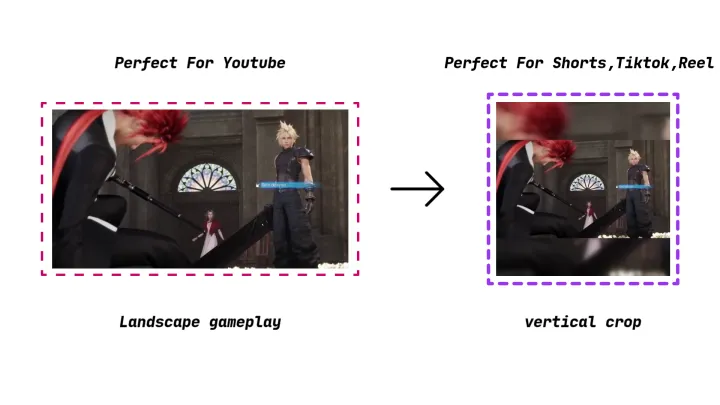
Gameplay is recorded in 16:9 but TikTok, Shorts, and Reels want 9:16. Here's how to convert gameplay clips to vertical videos without losing your HUD, minimap, or subtitles using a blurred background instead of a crop.
Read Article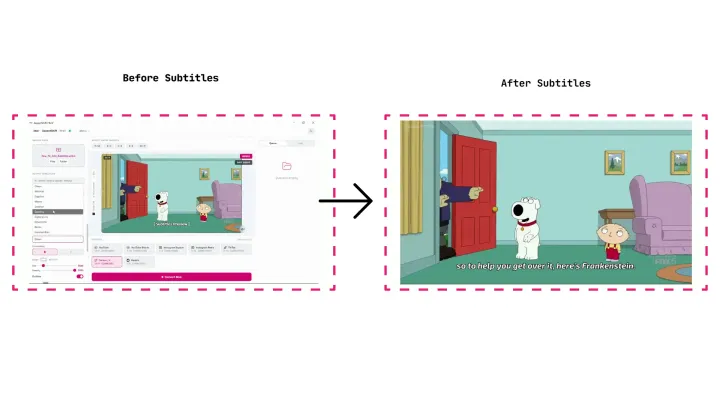
Generate accurate subtitles automatically, then customize the font style, size, color, transparency, and position. Burn them into your video or export an SRT — all in a few clicks.
Read Article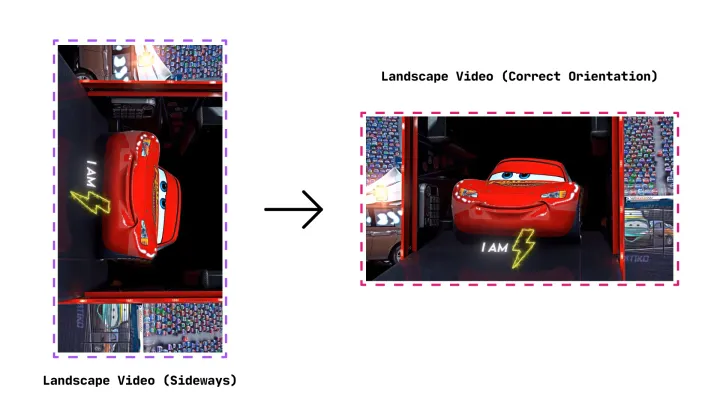
Learn how to fix video orientation, rotate sideways and upside-down videos correctly, and avoid common mistakes like stretching, cropping, and broken exports.
Read ArticleFrame Perfect, Every Time.
Stop exporting the same video Five times. Get AspectShift-HtoV and start repurposing faster - today.